All posts by Angelica

I’m a saved-by-faith-alone Christian, Texan-born-and-bred, stay-at-home mom that loves to craft and help people. I like to learn more so I can share with others.

Save Money #2: Press’n Seal instead of Transfer Tape

Got some negative cut outs that you would like to save without losing its arrangement? You might want to try Press’n Seal instead of transfer tape. I tried this technique with the negatives of the peaceful dove and it worked.

After cutting out the design, I left the paper on the cutting mat and cut enough Press’n Seal to cover the design. I then pressed it down onto the design with an old credit card by starting from the middle and worked outward. I ran my fingers over the Press’n Seal afterward to ensure it was stuck to the paper, and then I used one of my tapered clay tools to gently wedge off the design from the cutting board.  I would have liked it to have been a bit stickier, but it still works.

Two negative cuts of the peaceful dove pop up design saved with Press’n Seal

You can alternatively cut off a piece of Press’n Seal, lay it sticky side up, and then hand arrange a design to save your paper pieces.  Remember to mirror the design!

Week 41 of 2013 Savings & Freebies Roundup

This is updated throughout the week of October 6th through October 12th as I find sales and freebies become available.

Last Update: Saturday, October 12th

Continue reading Week 41 of 2013 Savings & Freebies Roundup

Save Money #1: Clean Out Your Blade Holder!

If you’re getting extra tearing or other bad cutting behavior, you should try cleaning out your blade holder before chucking it out in anger and getting a new one.  Take it out of the machine and ratchet the blade to 0.  After that, hold it in your left hand horizontally with the blade side outward, then, with your right hand, push inward and twist off the white cap by turning it toward you.  It should easily come off and the blade will be exposed.  Just tap the paper scraps gently out and then maybe use a Q-tip if there is still some left.

Check out what I found in mine!

shredded paper that had been stuck in blade holder

I found this tip out on a youtube comment on this video.  If it is your sort of thing, you can head over there and thank Kip.  ^_^

UPDATE October 7th, 2013:

I tried this with my blue blade holder and I can’t get it to unscrew.  When you press inward, you should feel the cap already give a little and then easily come off.  Do not try to force it to come off!

I examined both of the blade holders and they look identical except for the coloring.  So, try and see if you can take the cap off and tell me about it.

Freebie: 8.5×11″ Peaceful Dove Pop Up

I’ve been sitting on this for a couple months now since I converted it in the middle of the night like a mad woman.  I came upon the site, Kirigami Arts, through a commenter on Under A Cherry Tree‘s site.  When I saw the Peaceful Dove, I was determined to figure out how to convert the PDF into points and lines that the cutting machine could understand.  It took a lot of retracing and even editing the screenshot of the PDF to try to get better lines to work from, but I did it.  ^o^

I also made a second version with a shallower pop up effect because when I folded it all the way down, the bottom of the heart was being bent.  If anyone experienced with pop ups can tell me of alternate ways of fixing this problem, please let me know by commenting.  If you guys are interested in more pop up conversions, post links and I’ll take a look.  No guarantees, though.  ^_^

Instructions:  Download and open file in Silhouette Studio.  Put a 8.5×11″ paper on your cutting mat, load the mat in your machine, set cut settings for the paper, and cut!  The only weeding needed for this design is the negative space  of the heart.  Fold on the perforated lines and then fold a second paper in half for the front and back of the card.  Attach papers together with glue.

Terms Of Use:  You may modify and use for your personal use only.  Do not sell cut out copies of the design or sell the file.  Do not upload and claim it as your own.  Refer others back to this site instead of sharing the file.

angelicuts-peacefuldovepopup-preview↓Download↓

Original Conversion

Edit of Conversion

You can get the original PDF here and many other wonderful designs!

You Should Be Wary Of Free SVGs

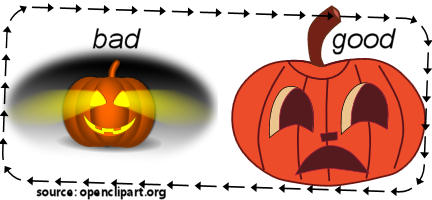
–especially if it is being called “clipart”!  The bulk of them are meant for clipart things like being printed on announcements, learning sheets, and old school websites.  They are not meant for a machine to cut them out.  If you tried, the machine would shred your paper because there are so many points and lines in clipart.  If you’ve already been visiting cutting machine websites, you can probably spot good candidates on these clipart sites.

Good VS Bad Clipart for Cutting Machines
Shading+a vignette prevent the left clipart from being useful to cutting machines.
  • Limited color palette–I would say about 10 would be the utmost you would want to stretch it.  2-5 colors (with two of them being black and white) work the best in my opinion.
  • Solid line or color around body of image
  • Clear delineation of the parts of the image

Even with these characteristics, it still may not be good to cut out because the vector work is bad.  In this case, you can convert it into a raster (bitmap) image and then trace it yourself.  I will be doing another post with examples.  I call this process “Do-Over-Tracing”.